

GitHub PRs
Promptless monitors your GitHub repositories for pull requests. You can choose when documentation updates trigger. They can run when a PR is opened, when it receives its first approval, or when it merges. They can also run on each new push while the PR is open.
Trigger modes
Section titled “Trigger modes”GitHub PR triggers support these modes:
Opened (default)
Section titled “Opened (default)”Triggers when a pull request is opened. This works well for teams that want documentation suggestions ready alongside code changes, giving reviewers time to evaluate both.
First approval
Section titled “First approval”Triggers when a pull request receives its first approval from a reviewer. Use this mode when you want documentation updates to start only after code has been reviewed. Promptless then analyzes final changes rather than work in progress.
Triggers when a pull request merges. Use this mode when you want documentation only for changes that have actually landed, rather than for work still under review.
Updated
Section titled “Updated”Triggers when new commits are pushed to an open pull request, re-reviewing it on every push. This mode is available for GitHub PR triggers only. It turns Promptless into a review bot for pull requests, keeping its suggestions current as the PR evolves. Use it when you want an open pull request re-reviewed continuously as it changes, rather than analyzed once. opened, first_approval, and merge each fire once; updated fires on every push.
This mode is opt-in and inert by default: nothing fires on pushes unless a github_pr clause explicitly lists trigger_on: [updated].
Every push produces a re-review pass, so a PR with many incremental commits yields many passes. That is more activity than the single-shot modes above. That volume is why the mode is gated behind explicit configuration. Scope it tightly: name an explicit repos list and narrow it further with trigger_directories.
On a push, Promptless applies the same guardrails as its other triggers: it skips draft PRs (see Draft pull requests) and skips Promptless-authored PRs. Pushes from any other contributor, including external and first-time contributors, re-trigger the review. The review keeps pace with the PR no matter who pushes to it. An @promptless mention does not bypass these filters or re-fire on a push.
How it works
Section titled “How it works”When a pull request event occurs in your monitored repositories (opened, first approval, merge, or a new push if updated is enabled):
- Automatic Detection: Promptless receives notification of the PR event
- Analysis: The system processes the full PR context to understand the changes
- Relevance Assessment: Promptless determines if the changes require documentation updates
- Suggestion Creation: If relevant, Promptless creates documentation suggestions
What Promptless reads
Section titled “What Promptless reads”Promptless analyzes the full pull request context, not just the description:
- PR title and description: The summary provided when opening the PR
- Code changes: The actual diff showing what files changed and how
- Review comments and conversations: Feedback from reviewers, including line comments and general discussion
- Commit messages: All commits in the PR, including those added after the initial submission
This means Promptless understands the why behind changes, even when reviewers request modifications that aren’t reflected in the PR description. When a reviewer asks for changes and the author addresses them with new commits, Promptless picks up both. It reads the feedback explaining what needed to change and the commits that address it.
Configuration
Section titled “Configuration”Configure GitHub PR triggers in your Configuration page using the triggers section:
triggers: my-pr-trigger: trigger_type: github_pr match: - repos: - acme/backend - acme/frontend trigger_on: - opened # When PR opens (default) - first_approval # After first approval - merge # When PR merges trigger_directories: - src/To turn updated on, add it to an existing clause’s trigger_on list. That clause must already name an explicit repos list, because an updated clause can’t use repos: all:
triggers: my-pr-trigger: trigger_type: github_pr match: - repos: - acme/backend - acme/frontend trigger_on: - opened # When PR opens (default) - first_approval # After first approval - merge # When PR merges - updated # Re-review on each new push trigger_directories: - src/Review-bot setup with updated
Section titled “Review-bot setup with updated”To run the review-bot cadence on its own, give the updated clause an explicit repos list and scope it with trigger_directories:
triggers: docs-review-bot: trigger_type: github_pr match: - repos: - acme/docs trigger_on: - updated # Re-review on each new push trigger_directories: - docs/The explicit-repos requirement is enforced per match clause, not per trigger. One trigger can therefore pair a broad clause for other events with a scoped updated clause. The repos: all restriction applies only to the clause that lists updated; other clauses in the same trigger can still use repos: all:
triggers: my-pr-trigger: trigger_type: github_pr match: - repos: all # broad clause for one-shot events trigger_on: - opened - merge - repos: # scoped clause required for updated - acme/docs trigger_on: - updated trigger_directories: - docs/See the Configuration Reference for all available options.
Replay recent PRs
Section titled “Replay recent PRs”When setting up a new GitHub PR trigger, you can enable “Replay recent PRs” to process pull requests from the last 30 days. This generates an initial batch of suggestions, which helps you:
- Calibrate Promptless with your documentation style before going live
- Catch up on documentation that may have been missed
- Evaluate how Promptless handles your typical PR content
After enabling this option, your Project card shows the replay progress:
- Processing last 30 days of PRs with a spinner while replay is running
- Processed recent PRs with a checkmark once replay completes
Directory-specific triggers
Section titled “Directory-specific triggers”You can configure Promptless to only trigger when changes are made to specific directories within your repositories. This is particularly useful when you want to focus documentation updates on changes to certain parts of your codebase.
To set up directory-specific triggers:
- Open the Configuration page and select the Triggers tab.
- Expand an existing GitHub pull requests trigger, or create one.
- Open More filters (optional).
- Enable Only when files in these folders change.
- Add each folder path as its own chip, separated by a comma or Enter.
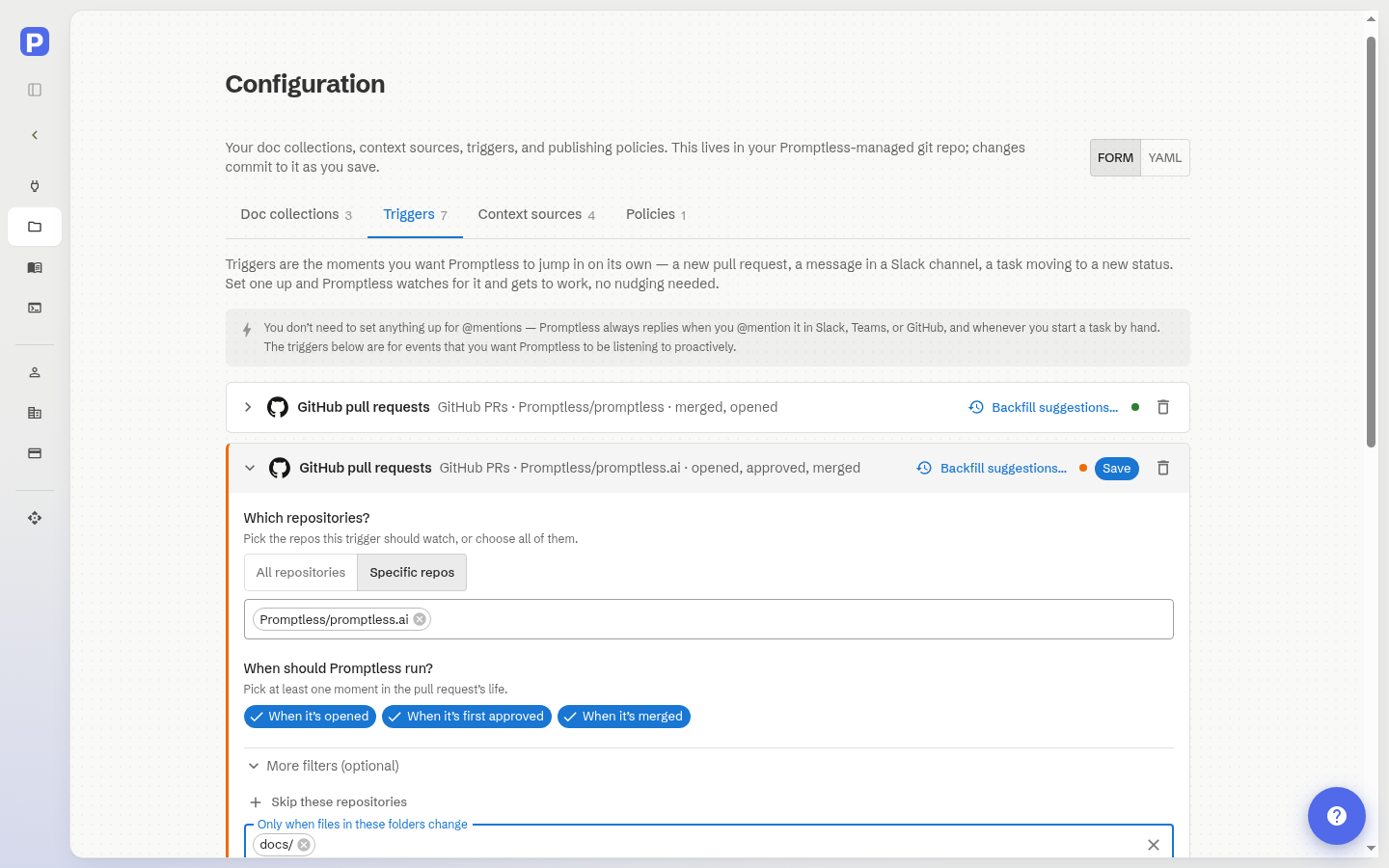
When trigger directories are specified, Promptless considers only PRs that contain changes to those directories and ignores updates to other files.
Repository topics
Section titled “Repository topics”If you have many repositories, you can use GitHub topics to control which ones trigger Promptless. This is especially helpful for organizations with dozens or hundreds of repos where only some need documentation automation.
-
Tag your repositories in GitHub: Add topics to the repositories you want Promptless to monitor (e.g., “docs-watch”, “promptless”). To add topics to a repository, go to the repository’s main page and click “Add topics” in the About section.
-
Configure your project: When creating or editing a GitHub project, check the “Trigger on repos with certain topics” option. Enter the topic(s) you want to monitor. You can specify multiple topics, and Promptless triggers on any repository that has at least one of those topics.
-
Manage through GitHub: To add a new repository to Promptless, tag it with the configured topic in GitHub. To remove a repository, remove the topic from the repository settings.
Automatic PR creation
Section titled “Automatic PR creation”When automatic PR creation is enabled in your publishing policies, Promptless automatically creates a new PR in your documentation repository with suggested changes.
Source PR comments
Section titled “Source PR comments”Promptless posts a summary comment on source PRs linking to any documentation changes. This keeps documentation updates visible alongside the code changes that triggered them.
The comment links directly to the documentation suggestions, so reviewers can see proposed updates while reviewing the code.
Suppress source PR comments
Section titled “Suppress source PR comments”Set suppress_source_pr_comments: true in your publishing policies to prevent comments on source PRs. Documentation suggestions are still created normally.
policies: default: publishing: suppress_source_pr_comments: trueThis option is commonly used:
- During pilot or onboarding periods, before Promptless has been introduced to the broader engineering team
- On public repositories, while keeping comments enabled for private repos
Draft pull requests
Section titled “Draft pull requests”Configuration files and dot-directories
Section titled “Configuration files and dot-directories”Promptless automatically skips pull requests that only contain changes to dot-directories (like .github/, .circleci/, .beads/) or root-level dot-files (like .gitignore, .editorconfig). These are typically CI and tooling configuration rather than product changes that need documentation updates.
If a PR contains both dot-files and regular source files, Promptless processes it normally. It only skips when the entire PR is dot-file changes.
Request documentation via PR title or description
Section titled “Request documentation via PR title or description”An @promptless mention in a PR’s title or description is a direct request, so Promptless reviews the PR regardless of your listening configuration. If your project only reviews after a first approval, the mention triggers a review as soon as the PR opens. If the PR targets your documentation repository (normally outside your source scope), the mention pulls it in anyway. Tagging Promptless does what you expect: Promptless reviews the PR.
Include the mention anywhere in the title or description:
## Summary
Added new authentication endpoints for SSO integration.
@promptless please document these API changes
Mention @promptless or @promptless-for-oss (matching is case-insensitive).
Request documentation via PR comments
Section titled “Request documentation via PR comments”Beyond automatic triggers, you can request documentation updates by @mentioning Promptless in a comment on any source pull request.
How to use
Section titled “How to use”Tag Promptless in a comment on a source PR to request documentation work:
@promptless please update the docs for this API changeWhen to use
Section titled “When to use”PR comment mentions are useful when:
- A PR was created before your trigger was set up
- You want documentation for a PR that’s already merged or closed
- The automatic trigger didn’t activate for your PR
- You want to provide specific instructions about what to document
Supported PR states
Section titled “Supported PR states”Promptless responds to comment mentions on pull requests in any state:
- Open PRs
- Draft PRs
- Merged PRs
- Closed PRs
Trigger from automated accounts
Section titled “Trigger from automated accounts”A direct @promptless mention doesn’t have to come from a person. It takes priority over Promptless’s bot filter. A comment from an automated account, like a GitHub Actions workflow, triggers documentation work just as a comment from a teammate does. This lets you build docs requests into your CI: have an Action post an @promptless comment whenever you want docs updated or reviewed.
For example, a GitHub Actions step can comment on a pull request to ask Promptless to document the change:
- name: Ask Promptless for docs run: gh pr comment "$PR_NUMBER" --body "@promptless please update the docs for this change" env: GH_TOKEN: ${{ secrets.GITHUB_TOKEN }} PR_NUMBER: ${{ github.event.pull_request.number }}The comment must include a direct @promptless mention. Promptless still ignores bot comments that don’t mention it. This works for any automated account, including CI or review Actions that run checks like Doc Detective or snippet validation.
The same priority over the bot filter applies when an automated account submits a formal PR review rather than a plain comment. You can place the @promptless mention in the review summary body or in any inline review comment, and either one triggers documentation work. A mention in the summary body gets a 👀 reaction on the review up front. A mention that appears only in an inline comment gets the 👀 reaction on that comment instead. Promptless still ignores bot reviews that don’t mention it. When Promptless does act, its reply names the @promptless mention as the reason, so the other account can decide whether to keep tagging it.
Requirements
Section titled “Requirements”- The GitHub integration must be installed for your repository
- You must explicitly @mention Promptless in the comment. Comments without a direct mention are ignored
Mentions in a review summary
Section titled “Mentions in a review summary”You can mention @promptless in the summary body of a submitted PR review, as opposed to an inline review comment. Promptless treats it as a direct request and reviews the PR, just as it does for a comment mention.
Setup instructions
Section titled “Setup instructions”To connect GitHub to Promptless, see the GitHub Integration setup guide.