

GitHub repos
Overview
Section titled “Overview”A GitHub doc collection is the GitHub repository where your documentation lives and where Promptless opens documentation pull requests. Your docs platform publishes from that repository, so your documentation stays under version control alongside your code.
The Promptless GitHub App has write access to your docs repository. When your documentation needs an update, Promptless opens a pull request there. Your documentation platform then syncs the changes from GitHub.
Each repository is its own doc collection. Promptless can publish to several doc collections from the same triggers and context sources. To give one collection its own publishing or notification settings, scope a policy rule to it with doc_collection.
Connect GitHub
Section titled “Connect GitHub”Skip this section if the organization that holds your docs repository already has a card on the Integrations page. To publish to a public repository without granting write access, connect the read-only app.
You need an admin role in your Promptless organization to start a GitHub connection. GitHub then asks you to authorize the Promptless GitHub App with your GitHub account. The connection completes only if that account administers the organization or account you connect. For a GitHub organization, that’s an organization owner. For a personal account, it’s the account owner.
On GitHub Enterprise Server, or on GitHub Enterprise Cloud when a policy blocks third-party apps, connect through a custom GitHub App. See GitHub Enterprise integration.
-
In the Promptless dashboard, open the Integrations page.
-
Select Connect GitHub.
-
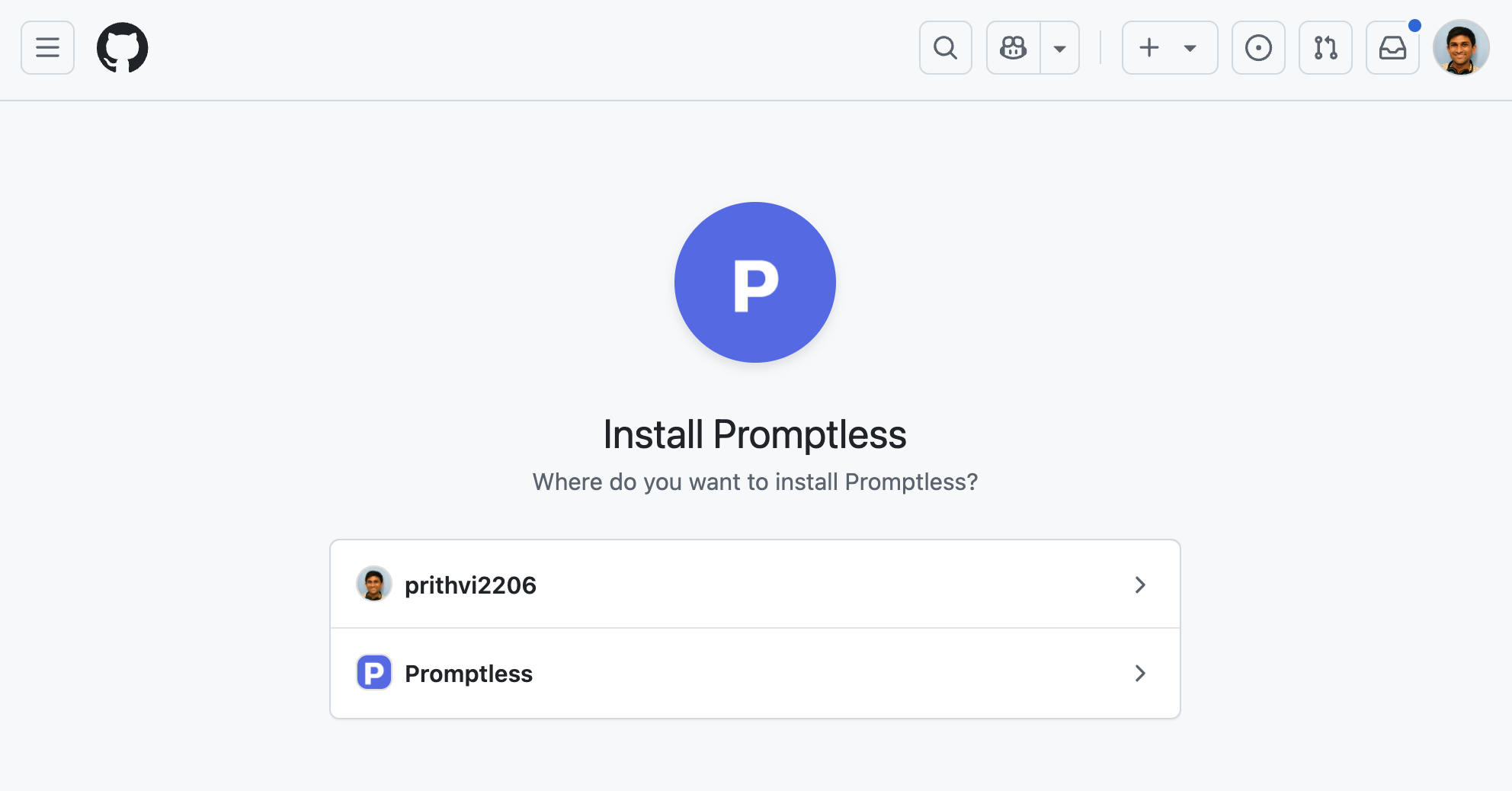
In GitHub, select the organization to install Promptless into.
-
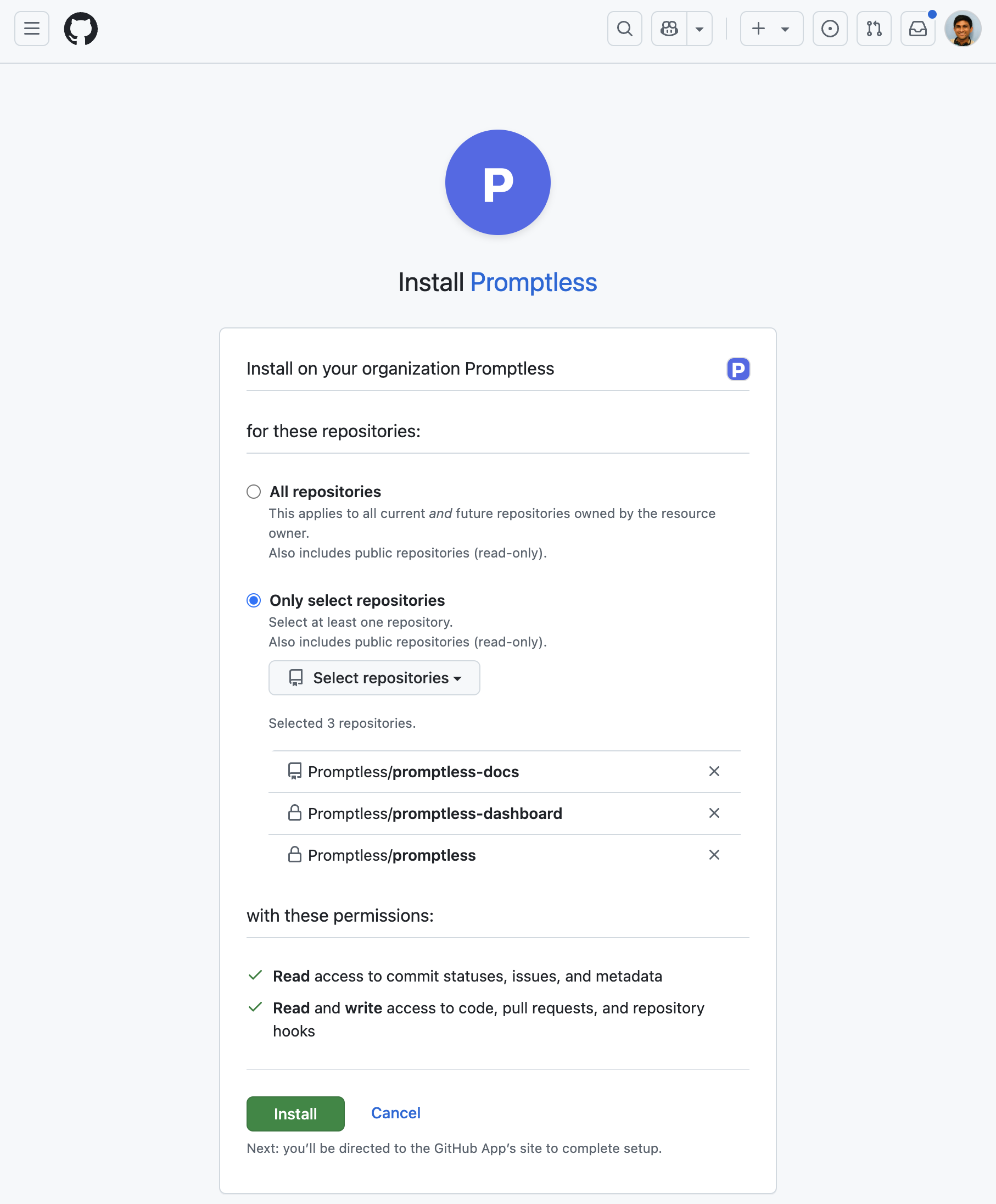
Select the repositories Promptless can access. These are typically your source code repositories and, if your docs live in GitHub, your documentation repository.
-
On the Integrations page, confirm that the organization appears on its own card.
The connection link stays valid for one hour. If it expires before you finish, start the connection again from the Integrations page.
Some GitHub organizations require an owner’s approval to install a third-party app. If yours does and you aren’t an owner, GitHub asks you to request approval. To connect in that case:
-
Complete GitHub’s approval request flow. The GitHub card on the Integrations page shows Waiting on an organization owner while the request is open.
-
Ask a GitHub organization owner to approve the Promptless GitHub App in the organization’s Third-party Access settings.
-
After the owner approves, confirm that the organization appears on its own card. Promptless connects the approved installation automatically. To check right away, select Check for approval on the card.
If GitHub can’t reuse the approved installation, uninstall the Promptless GitHub App in GitHub, and connect again.
If your GitHub organization enforces an IP allow list, GitHub blocks requests from Promptless until an owner allows them. See Organization IP allow lists.
Connect the read-only app
Section titled “Connect the read-only app”Skip this section if the read-only app is already connected. Connect the GitHub (read-only) app to publish to a public repository without granting write access. The app gives Promptless read access and webhooks only, and Promptless publishes through its own fork. See Read-only integrations.
You need an admin role in your Promptless organization to connect an integration.
-
In the Promptless dashboard, open the Integrations page.
-
Select Connect GitHub (read-only).
-
In GitHub, grant the app access to the repositories you want Promptless to work with. For open-source publishing, include the public repository whose docs you want to keep current.
The integration appears on the Integrations page as its own GitHub (read-only) card. To change which repositories Promptless can access, select Configure in GitHub on that card. It opens the app’s installation page in GitHub.
Supported platforms
Section titled “Supported platforms”Promptless publishes to any docs platform or framework whose content lives in a repository. The Docs framework setting recognizes these platforms:
| Platform | docs_framework value |
|---|---|
| Docusaurus | docusaurus |
| Fern | fern |
| GitBook | gitbook |
| Hugo | hugo |
| mdBook | mdbook |
| Mintlify | mintlify |
| MkDocs | mkdocs |
| ReadMe (Refactored) | readme |
| Shoalrun | shoalrun |
| Sphinx | sphinx |
| Starlight (Astro) | starlight |
Promptless also publishes to Ghost, Nextra, Vocs, and custom platforms, as long as the content is in a repository.
To publish through a Git host other than GitHub or GitLab, contact help@gopromptless.ai. The Promptless team can also help you choose a new docs platform and set it up. See Choose a docs platform.
Configuration
Section titled “Configuration”Doc collections live in the doc_collections section of your promptless.yaml file, keyed by repository name. Edit them on the Configuration page in the dashboard, or in YAML:
doc_collections: acme/documentation: docs_framework: docusaurus docs_root_url: https://docs.acme.com filter: - docs/Triggers that start documentation updates live in the separate triggers section. See the configuration reference for the complete schema.
Each doc collection takes these settings:
| Dashboard field | YAML field | What it sets |
|---|---|---|
| Repository | The key under doc_collections | The repository Promptless publishes to, as owner/repo. |
| GitHub Enterprise host | host | Your GitHub Enterprise hostname, such as github.acme.com. Applies only to GitHub Enterprise. |
| Docs framework | docs_framework | The framework your site builds with. See Supported platforms. |
| Framework config file | config_file_path | The path to your framework’s config file, such as docusaurus.config.js, when it isn’t at the repository root. |
| Where are these docs published? | docs_root_url | Your public documentation site URL. |
| Only watch these folders | filter | The directories and files Promptless can modify. See Path scope. |
| Default branch | default_branch | The branch documentation PRs target. Without it, Promptless targets the repository’s default branch. |
| Vale config path | vale_config_path | Turns on Vale linting with the config at this path. |
| Doc Detective config path (optional) | doc_detective.config_path | Path to your Doc Detective config when it isn’t at the repo root. |
Promptless sets the platform from the integration that reaches the repository. In YAML, platform defaults to github. See the configuration reference for the other platform values.
Edit doc collection settings
Section titled “Edit doc collection settings”You can change every setting in the table from the dashboard:
-
On the Doc collections tab of the Configuration page, expand the doc collection.
-
Change the settings.
-
Select Save changes.
Path scope (documentation directories)
Section titled “Path scope (documentation directories)”Path scope sets which files Promptless can create and modify in your documentation repository. Set it with Only watch these folders in the dashboard or filter in YAML. With no entries, Promptless can change any file in the repository. With entries, a file must match an entry exactly or sit inside an entry’s directory.
Each entry is a directory or a single file:
| Scope entry | Promptless can modify | Promptless can’t modify |
|---|---|---|
| None | Any file in the repository | Nothing |
docs/guides | docs/guides/getting-started.md and docs/guides/advanced/configuration.md | README.md and src/components/Button.tsx |
CHANGELOG.md | CHANGELOG.md | Every other file |
Promptless rejects a suggestion that changes files outside the scope, with an error that lists those files. Path scope keeps changes inside your documentation area, which matters in a monorepo where docs live alongside source code.
Pull request publishing
Section titled “Pull request publishing”These behaviors apply to the documentation pull requests Promptless opens. Set them in your publishing policies:
| Behavior | What Promptless does | How to change it |
|---|---|---|
| Automatic PR creation | Opens a pull request in your documentation repository for each suggestion. | Set publishing.auto_create_pr: true. |
| Code PR comment | For GitHub PR triggers, links the documentation PR in a comment on the original code PR. | Set publishing.suppress_source_pr_comments: true to stop the comments. |
| Auto-merge | Merges the documentation PRs Promptless opens automatically. | Set publishing.auto_merge: true along with auto_create_pr. |
| PR description extras | Adds an “Open in Promptless” link, the trigger events, and a tip to the PR body. | Set publishing.suppress_pr_description_extras: true to omit them. |
| CI check and build fixes | Watches the PR for failed checks and build problems, and pushes fixes to the PR branch. | Always on. See CI check and build fixes. |
With auto-merge on, a documentation PR from a commit trigger merges as soon as Promptless creates it. A documentation PR for an open code PR merges after the code PR merges. Auto-merge skips a documentation PR whose base branch is protected, or whose repository uses the read-only GitHub app. Merge those PRs yourself.
CI check and build fixes
Section titled “CI check and build fixes”Promptless watches each documentation PR it opens for quality problems. These include failed CI checks, linting errors, Vale rule warnings, and broken links or build problems that your documentation host reports. When one occurs, Promptless analyzes it and pushes a fix to the PR branch.
The Promptless GitHub App needs no extra setup for this. A custom GitHub Enterprise app needs the Checks read permission and a subscription to the Check suite webhook event. Promptless learns about CI failures only through check suite events.
Read-only integrations (public repositories)
Section titled “Read-only integrations (public repositories)”To publish to a public repository without granting write access, back its doc collection with the GitHub (read-only) integration. Promptless then creates its own fork and opens a pull request from the fork into your upstream base branch. Private repositories need the standard GitHub App. See How publishing works for the fork flow.
Trigger events in pull request descriptions
Section titled “Trigger events in pull request descriptions”Each documentation PR description lists the trigger events that led to its changes, so reviewers can trace an update back to where it started. Each entry links to the original source, such as a Slack thread, GitHub PR, or support ticket, and briefly describes what prompted the update.
For Slack triggers, the link label names where the message came from, followed by a snippet of the message:
| Message source | Example link label |
|---|---|
| Public channel | ”Message in Slack channel #docs: please update the API guide” |
| Direct message | ”Private Slack DM with Jane Doe: can we add an example here” |
| Group message | ”Private Slack group message: the onboarding flow needs updating” |
Slack shows an error page to a reviewer who opens a link to a private conversation they’re not in. The “Private Slack DM” and “Private Slack group message” labels tell reviewers the link is restricted. For these messages, Promptless adds a second link to the suggestion’s Triggers & Analysis tab in the dashboard. Anyone with dashboard access can read the full message there, whatever their Slack permissions.
Frequently asked questions
Section titled “Frequently asked questions”When the repository picker can’t find a repository, it shows “No connected repository matches that.” These are the usual causes:
| Problem | Cause | Fix |
|---|---|---|
| The picker lists none of your GitHub repositories. | GitHub isn’t connected. | Connect GitHub. Then return to the doc collection. |
| One repository is missing from the picker. | The Promptless GitHub App doesn’t have access to it. | Add the repository to the app’s access in GitHub. See Manage repository access. |
See also
Section titled “See also”- GitLab projects, to publish documentation to a GitLab project
- GitHub PRs, to start documentation work from pull requests in your code repositories
- Configuration Reference, for every doc collection field