
GitHub Repos (Docs as Code)
The most common documentation setup uses GitHub repositories to store documentation content that syncs to hosting providers. This “docs as code” approach allows you to version control your documentation alongside your code.
Prerequisite: Before creating a GitHub-based doc collection, you must first connect GitHub on the integrations page. Without an active GitHub connection, you won’t see any repositories in the dropdown when setting up your doc collection.
Supported Platforms
Section titled “Supported Platforms”When your documentation lives in GitHub, Promptless can publish to any of these platforms:
- Fern
- Mintlify
- ReadMe (Refactored)
- GitBook
- Docusaurus
- MkDocs
- Hugo
- Ghost
- Nextra
- Starlight (Astro)
- Vocs
- Custom platforms (as long as the content is in a repo)
How It Works
Section titled “How It Works”- Repository Setup: Your documentation files live in a GitHub repository
- Promptless Integration: The Promptless GitHub App has write access to your docs repository
- Automatic PRs: When documentation updates are needed, Promptless creates pull requests in your docs repo
- Platform Sync: Your documentation platform automatically syncs changes from GitHub
Project Setup and Permissions
Section titled “Project Setup and Permissions”After setting up the GitHub integration, you’ll create a project in the projects page. When creating a project, you’ll select:
- Trigger repositories: Repositories that initiate documentation updates (read-only access)
- Documentation repositories: Repositories where documentation is stored (write access)
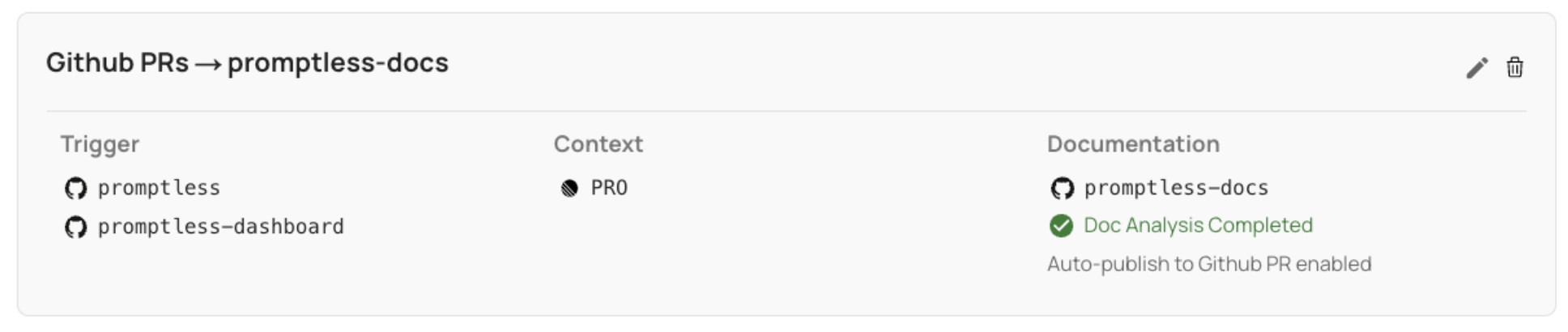
In the example above, Promptless can read the promptless and promptless-dashboard repos, but can read and write to the promptless-docs repo.
Auto-publish Mode
Section titled “Auto-publish Mode”When auto-publish is enabled for your project:
- Promptless automatically creates a new PR in your documentation repository with suggested changes
- For GitHub PR triggers, the documentation PR is linked in a comment on the original code PR
- For commit triggers, you can enable auto-merge to automatically merge documentation PRs as soon as they’re created (nested checkbox under auto-publish in project settings)
Automated CI Check and Build Issue Resolution
Section titled “Automated CI Check and Build Issue Resolution”When Promptless opens a documentation PR, it automatically monitors the pull request for quality issues. If CI checks fail, linting tools report errors, Vale rules trigger warnings, or your documentation hosting provider detects broken links or build problems, Promptless will automatically analyze the issues and push fixes directly to the PR branch.
This automated issue resolution works seamlessly with your existing GitHub workflow - there’s no additional configuration needed. Quality problems get resolved in the background while you focus on content rather than troubleshooting technical issues.
Trigger Events in Pull Request Descriptions
Section titled “Trigger Events in Pull Request Descriptions”When Promptless creates a pull request for documentation updates, it automatically includes a list of the trigger events that led to those changes in the PR description. This provides valuable context for reviewers and creates clear traceability between documentation updates and their originating events.
The trigger events section in the PR description includes:
- Links back to the original source (e.g., Slack threads, GitHub PRs, support tickets)
- Brief descriptions of what triggered the documentation update
- Easy navigation to review the context that prompted the changes
Multi-Platform Publishing
Section titled “Multi-Platform Publishing”Promptless can publish to multiple documentation repositories simultaneously, allowing you to use the same trigger events and context sources across different doc sites.
Tip
For teams using multiple doc sites, create separate projects for each documentation location to maintain clear separation of content and workflows.
Requesting Additional Platforms
Section titled “Requesting Additional Platforms”Need integration with a Git-hosted platform not currently supported? We’re continuously expanding platform support based on user feedback. Contact help@gopromptless.ai. Also contact us if you’re hoping to migrate to a new docs platform and we’ll be happy to help you choose and set up.
Setup Instructions
Section titled “Setup Instructions”To connect GitHub to Promptless, see the GitHub Integration setup guide.
Frequently Asked Questions
Section titled “Frequently Asked Questions”I don't see any repositories in the dropdown when creating a doc collection
If the repository dropdown shows “No options” when creating a doc collection, you need to connect GitHub first. Go to the integrations page and click “Connect GitHub” to install the Promptless GitHub App. Once GitHub is connected, return to creating your doc collection and your repositories will appear in the dropdown.
If you’ve already connected GitHub but still don’t see your repositories, you may need to grant Promptless access to those specific repositories. Visit your GitHub organization settings, find the Promptless GitHub App under “Third-party Access” → “GitHub Apps”, and add the repositories you need.