

When YOU are the Docs Team - Lessons from Working with Some of the Best Writers and Managers in the Industry

Most tech writers work as part of a team. Most operational and career advice in tech writing is likely written by and for people on established docs teams. But being the only technical writer at a company or being the leader of a docs team comes with its own distinct challenges. We’ve had the pleasure of working with some of the best solo writers and docs team leads in the industry. Here’s what we learned.
1. You’ve probably inherited a mess
Section titled “1. You’ve probably inherited a mess”Joining a company as the first technical writing hire almost always means inheriting docs cobbled together by engineers, PMs, and support staff. They’re partially accurate, inconsistently voiced, with information structure that once made sense when the product had two features.
The instinct is to fix the content first, one section or product area at a time. But with AI, you should actually establish the style guide first. You shouldn’t rely solely on AI to rewrite your content, because the AI’s product knowledge is only as good as your current docs. So accurate content will have to come from you and your SMEs. However, AI is quite good at fixing voice, style, and formatting at scale with minimal supervision. You can even add the style guide to CONTRIBUTING.md for your docs repo. This way it gives other docs contributors’ AI agents a consistent voice, minimizing new style debt being introduced.
A good example of a style guide can be found at Kubernetes. It’s not just about formatting. Standardizing reference terms like A PodList object is a list of pods. over A Pod List object is a list of pods. help both humans and AI agents. You can read more about optimizing for agent-facing style guides here
2. Build your operating system
Section titled “2. Build your operating system”When you are the docs function, you may need to process more information than anyone else at the company. Signals from pull requests, Slack, forums, Discord, internal meetings, design reviews, and support tickets can all land on your desk. This requires building systems and automation — otherwise you’ll either be perpetually behind and reactive, or burn out within 18 months.
2.1 Build the information pipeline
Section titled “2.1 Build the information pipeline”Setting up information systems feels like a distraction from writing. It’s not. An hour building automation can be worth weeks of reactive catch-up on missed changes.
A plausible setup:
- Slack
- Set up a
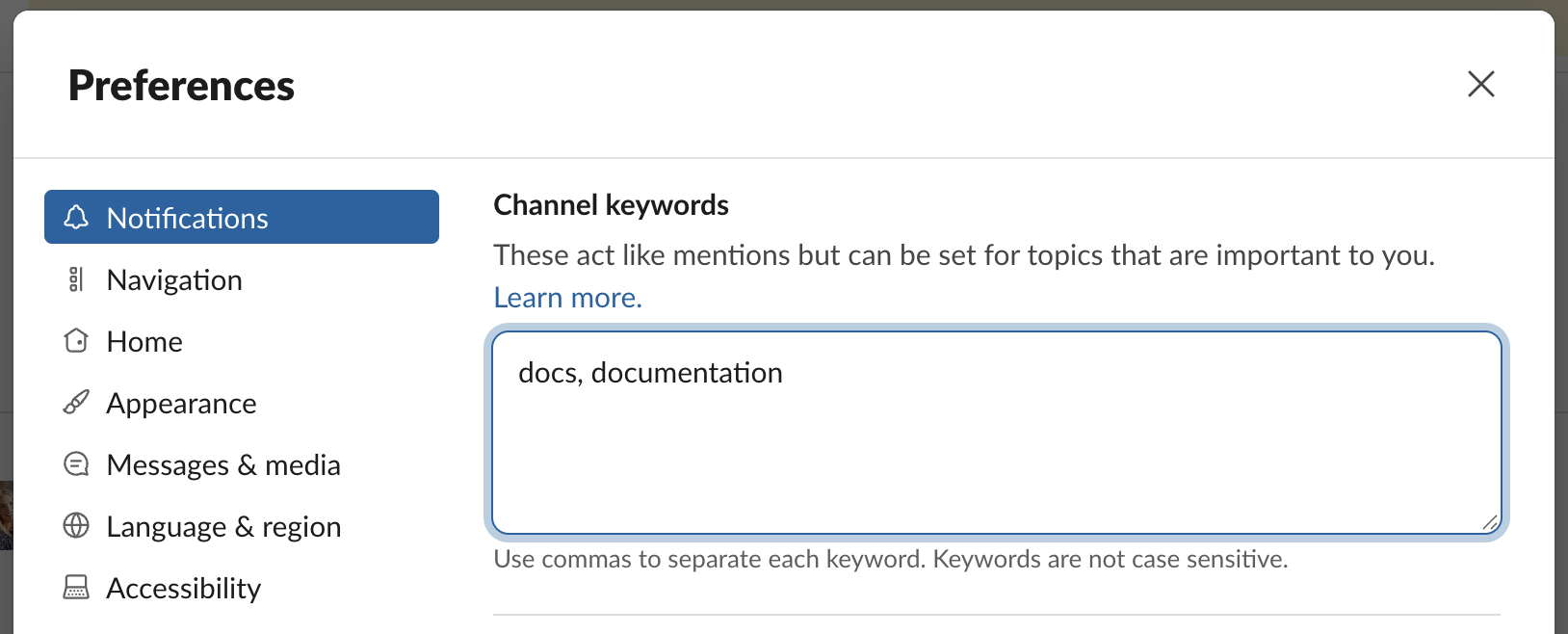
#docs-requestSlack channel, announce it to the company - Set up Slack keyword alerts for
docsanddocumentation
- Set up a
- Github
- Build a Github action to run after each engineering PR is opened/merged and monitor for docs changes.
- Support platform
- Monitor support tickets that mention docs
- Keep track of searches on the docs site’s AI chatbot
- Task management
- Set up a DOCS project in Jira/Linear and have the team submit requests there
- Use Github projects to organize your work
For team leads, the pipeline also needs routing logic: when a PR touches the auth flow, which writer gets notified? When support volume spikes in a product area, who owns it? The information system is also about getting the right signal to the right person at the right time.
You can read more on ambient capture here, which is how we think about this problem. If you don’t want to set up and maintain this system yourself, Promptless automates it completely, including the routing.
2.2 Scale yourself
Section titled “2.2 Scale yourself”You can’t be in every engineering standup everywhere all at once. Send a bot to record and transcribe standups, design reviews, and certain customer meetings. Set up a pipeline to send meeting transcripts to a GitHub repo, and run an LLM filter over them to find doc-impacting content. Engineering standups can contain valuable information about design decisions or API details. Having that repo of transcripts also means you can point Claude Code or Codex at it and ask questions while you’re writing.
2.3 Build product intuition
Section titled “2.3 Build product intuition”Dogfood, dogfood, dogfood. Technical writers are among the best people at a company to develop customer empathy, because they don’t just need to understand something — they need to teach someone else how to do it. Pair with engineers and have them walk you through the product. Set up a dev environment. Write code against the API (or ask AI to). Go through the UI flows. The gaps you hit are the gaps your users will hit. For team leads, build dogfooding into writer onboarding before anyone writes a single doc.
Writing from specs produces docs that are technically accurate, but dogfooding is what lets you write that callout that makes a user think: “wow, it’s reading my mind”.
3. Make your impact visible
Section titled “3. Make your impact visible”Documentation is invisible when it’s working. Users don’t thank you for clear instructions, they just complete the task. This makes impact systematically hard to demonstrate, which matters for headcount, compensation, and the organizational agency to do proactive work. You’ll have to build that visibility deliberately (and we’re here to help!).
3.1 Reporting to someone who doesn’t know your craft
Section titled “3.1 Reporting to someone who doesn’t know your craft”There’s no Chief Docs Officer, unfortunately. So both solo writers and docs team leads typically report into either Product or Engineering. Managers who came up through those two functions may have no intuition for what makes docs genuinely great versus barely usable. They can’t appreciate the human judgement that went into the decision to add this particular how-to guide, or to patch a gap in knowledge that the doc assumes but the user doesn’t have. If you have a manager who values docs, congrats! For managers who can’t tell good from bad, they’ll struggle to defend resources, calibrate workload, or recognize exceptional work. The solution isn’t to teach them the intuition, it’s to demonstrate positive outcomes.
3.2 Outcome metrics worth watching
Section titled “3.2 Outcome metrics worth watching”These metrics are often tracked by support or product teams already, so you can ask for them rather than building from scratch.
Time to first value
Section titled “Time to first value”- Definition: Onboarding means different things at different companies. It could be creating a first project, calling an API, spinning up a cluster, or adding an SDK to a codebase. But whatever it is, it’s almost always the first time users need docs. If you’re refactoring onboarding content or adding tutorials around first-use flows, this is the metric to watch before and after.
- How to track: If calling an API is your clearest signal of first value, you can track the time between
user.created_atand the user’s first successful API call, withapi_key.created_atas a useful intermediate step to diagnose where people get stuck.
Direct feedback from docs
Section titled “Direct feedback from docs”- Definition: For each page, you’ll have the “This doc is helpful/not helpful” button, you can get very granular page-level signal before and after a major refactor.
- How to track: Most docs platforms offer this as a built-in feature.
Support volume by product area
Section titled “Support volume by product area”- Definition: If you’re doing a content refactor of a specific area, monitor support ticket volume for that area as a before/after signal. Product and support teams almost always track this already. Most support tools let you filter by topic or tag. You can also download support data and point an AI agent at it to do the analysis.
- How to track: If it’s not tracked already, you should be able to export a CSV of support tickets from your support platform, then use the top-level sections of your docs, such as Getting Started, Integrations, or API Reference as your topic taxonomy. From there, you can ask Claude Code or Codex to write a script that classifies each ticket into one of those topics based on the topic/summary.
Search zero-results rate
Section titled “Search zero-results rate”- Definition: If your docs platform has search analytics or an AI chatbot, queries that return no results are a direct inventory of content gaps. A spike in zero-results searches after a product launch indicates users are turning to docs to learn something that isn’t documented yet.
- How to track: Most AI chatbot providers should have this out-of-the-box. Some of them will even rate the “uncertainty” of responses, and will cluster common questions with bad/uncertain results.
Feature adoption rate
Section titled “Feature adoption rate”- Definition: Low adoption on a new release can often be a docs problem. If adoption improves after adding docs, that’s attributable impact, and it’s hard to explain away as coincidental.
- How to track: a new product may show up as a new SKU in your billing system, a new entitlement in your product database, or usage of a new API endpoint. Measure adoption with a day-0 to day-X curve, where X might be 30 or 60 days, showing the percentage of customers using the new product out of the total eligible customer base; to make that number meaningful, compare it against the same day-0 to day-X adoption curves for other product launches as your baseline.
Agent success rate
Section titled “Agent success rate”- Definition: If your company runs an in-house or third-party agent that depends on the docs, after the development stabilizes (so that you don’t get confounding signals), track its success rate. An agent is only as good as the context it’s given, which means its performance is a direct proxy for your docs quality and value.
- How to track: For example, if your company has a support bot that answers product questions by retrieving from your docs, you can track the percentage of conversations that are resolved without escalating to a human. In practice, that usually means measuring things like deflection rate, repeat-question rate within a set window. Some of the support agent providers report these numbers automatically.
3.3 What leadership understands and cares about
Section titled “3.3 What leadership understands and cares about”Two things resonate with leadership, regardless of what background they had:
- Higher productivity and efficiency
- Tighter feedback loops
This is where AI tooling adds the most leverage — agents can monitor PRs for doc-breaking changes or flag support ticket clusters pointing to a specific page, then create a draft automatically for you to review. You can reduce the turnaround time to under an hour.
4. Building allies
Section titled “4. Building allies”4.1 Make friends with the Support team
Section titled “4.1 Make friends with the Support team”Your support team sees what users are struggling with before and after documentation changes. A doc that reduces handle time on a common question has a real dollar value. You’ll also hear anecdotes (e.g. a customer who had to be refunded a large credit because of a docs error), and those stories are exactly what you need when making the case for resources.
Ask support to label tickets with docs when applicable. It takes each person a few seconds, but it gives you a clean data feed without additional manual work. A bi-weekly check-in with someone on support produces both better prioritization and impact data you can use elsewhere.
4.2 Help engineers help you
Section titled “4.2 Help engineers help you”Whether or not engineers formally contribute to docs, make it easy for them to bring their domain expertise. Create a docs PR template that contains a short review guide with explicit instructions. For instance: “when there’s a code snippet, please test it. Also please verify command accuracy, parameter correctness, and expected output.” Engineers know how to review code; they don’t inherently know how to review docs. Without guidance, you’ll get rubber stamps that miss the things only they would catch.
4.3 Find other writers outside your company
Section titled “4.3 Find other writers outside your company”The Write the Docs Slack has a dedicated #lone-writer channel and a separate #managing-writers channel for team leads. If you haven’t joined, you should!
5. Adapting to AI
Section titled “5. Adapting to AI”5.1 Accuracy over polish
Section titled “5.1 Accuracy over polish”Information architecture still matters for human readers. But AI agents are increasingly part of the audience, and they process content differently. An agent won’t trip over mIxEd hEAdIng caSeS or a rndom typpo, but stale information will cause it to confidently hallucinate an answer or get stuck at execution time. As a solo writer or writing manager inevitably juggling competing priorities, you can deprioritize polish when needed, but accuracy and freshness becomes more important than ever.
5.2 Shadow docs
Section titled “5.2 Shadow docs”A human reader navigating your docs faces cognitive overload if there’s too much content. An AI agent doesn’t have the same problem. This opens up a category worth considering: content too niche or edge-case for your main doc tree, but that agents would use effectively. You can keep it as its own section of “For AI Agents” to avoid cluttering the human experience. Content can include real support cases with customer information redacted, known workarounds for uncommon configurations, etc. All of it leads to fewer support tickets and higher agent task success rate.
5.3 Rethink form factors
Section titled “5.3 Rethink form factors”Think about customer education and agent education from first principles, because many of the constraints that shaped old conventions no longer apply. Most teams avoided screenshots because they were painful to maintain, not because they aren’t useful — but now screenshots can be updated automatically (let us know if you’re curious 😉). These new capabilities allow you to ask the question: Given how humans and agents actually ingest information, what helps them succeed fastest?
An example of building from first principles is PostHog’s new AI wizard managed by the docs team. It helps the user onboard with one single command. For more first principles on how agents process information, here’s our piece on how to write docs optimized for them.
Whether you’re a team of one or leading a docs team, the tasks are similar: build the systems that keep content alive and accurate, make the work visible to the people who decide what gets resourced, and stay close to how customers actually use the product. The craft of writing may become table stakes, but there’s still a great deal of human judgment that goes into making good docs. You can try out Promptless to scale your systems so you can focus on the work AI can’t do.