
Deep Analysis
Use Deep Analysis when a request needs more research or scope than a regular trigger can handle. Instead of producing a single drive-by edit, Promptless reviews your source code, audits your existing docs, and returns a coordinated set of suggestions.
When to use Deep Analysis
Section titled “When to use Deep Analysis”Deep Analysis is built for projects that span multiple pages, need background research, or call for a coherent plan before any edits land:
- Refactoring documentation sections — restructure or rewrite an entire section to match a new pattern or stronger examples.
- Documentation audits — check the whole collection for consistency, accuracy, or style compliance.
- Writing docs from scratch — produce comprehensive documentation for a new feature or product.
- Filling in OpenAPI specs — add error codes, examples, or other structured data across an API reference.
For routine updates, stick with Slack, GitHub PR triggers, or a regular New Task. Deep Analysis is heavier and slower, so reach for it when the work genuinely calls for it.
Submitting a request
Section titled “Submitting a request”Deep Analysis runs through the New Task form. Check the Deep Analysis box and the form expands to show templates and a larger instructions field.
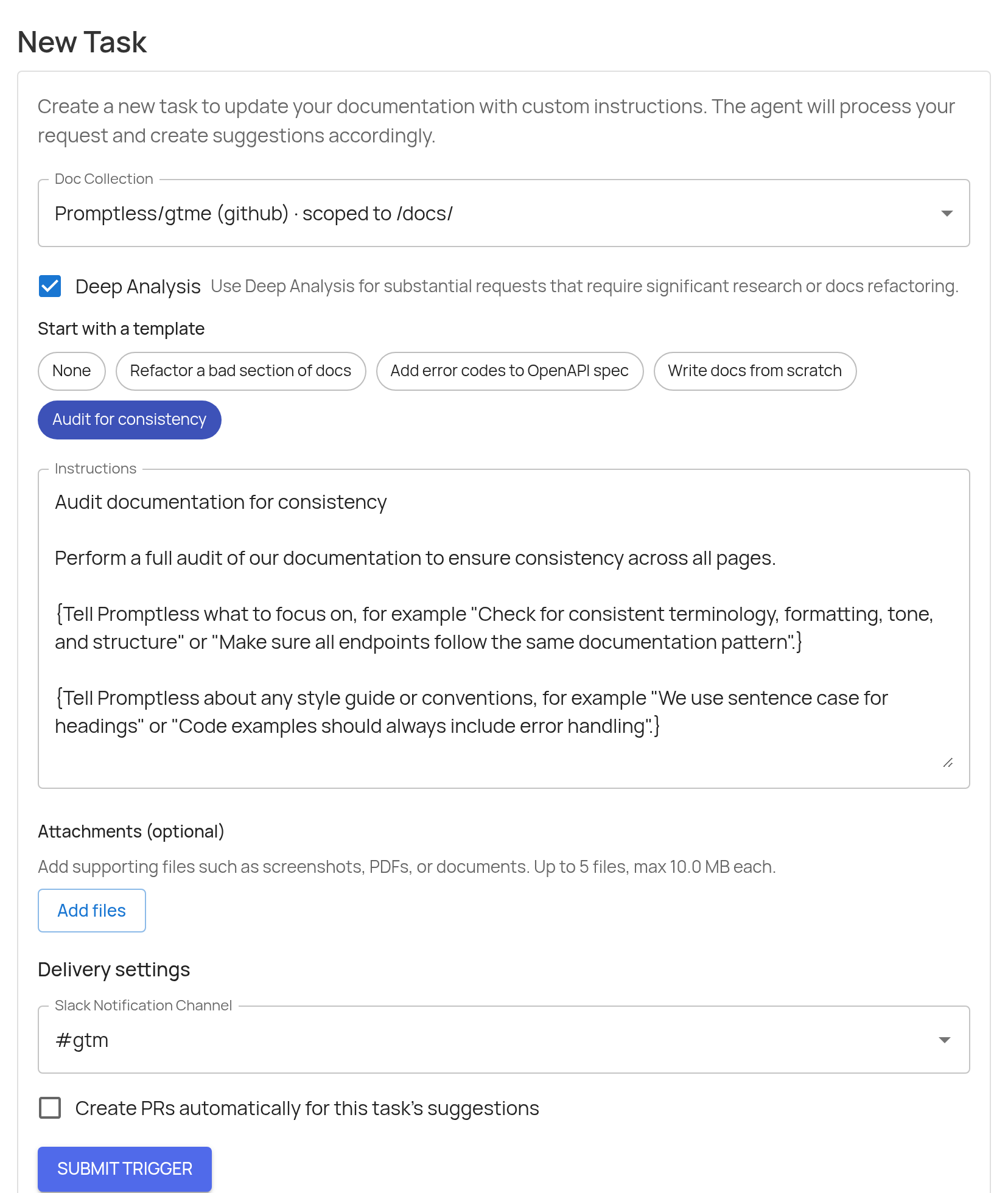
Open New Task
Click New Task in the sidebar. You can also use the Deep Analysis deep link, which opens New Task with Deep Analysis already checked.
Select a doc collection
Choose the doc collection you want Promptless to update. Only collections that have finished initial analysis appear in the list.
Check Deep Analysis
Tick the Deep Analysis box. Template chips appear and the Instructions field expands to give you more room.
Pick a template (optional)
Choose a template to pre-fill the Instructions field with a starter prompt. Templates include placeholder hints in {curly braces} so you know what context to add. Pick None to start from a blank field.
Write the instructions
Describe the project in the Instructions field. Include the product area, source code or APIs Promptless should inspect, examples to model, and the changes you want to focus on. There is no separate title field — the first line of your instructions becomes the request title.
Attach files (optional)
Use Add files or paste directly into the field to attach supporting material like screenshots, PDFs, or specs. You can include up to 5 files, 10 MB each.
Choose delivery settings
Pick a Slack channel to receive progress notifications, or leave it as No Slack notification. If your doc collection is backed by GitHub, you can also check Create PRs automatically for this task’s suggestions to skip the manual review step for each suggestion this run produces.
Submit
Click Submit Trigger. Promptless confirms the submission and links to the Triggers page so you can follow progress.
Note
Deep Analysis runs may take several hours and can produce multiple suggestions across your documentation. They run in the background — you don’t need to keep the tab open.
Templates
Section titled “Templates”Deep Analysis ships with four templates for the most common project shapes:
- Refactor a bad section of docs — improve an existing section using another set of docs as a model.
- Add error codes to OpenAPI spec — add comprehensive error codes and examples to your API specification.
- Write docs from scratch — produce new documentation with guidance on outline, audience, and style.
- Audit for consistency — review all documentation for consistent terminology, formatting, and structure.
Each template seeds the Instructions field with a title line, a description, and bracketed placeholders that prompt you for the context Promptless needs. You can edit the prefilled text freely before submitting.
What happens after you submit
Section titled “What happens after you submit”A Deep Analysis trigger is routed to a fresh agent with the Deep Analysis workflow enabled. Before drafting any documentation, that agent runs two mandatory research passes:
- A source code review of the configured source repos to confirm how the feature actually behaves today.
- A docs audit of the target collection to find related pages, gaps, duplicates, terminology, and writing conventions.
Once both reviews are complete, the agent plans the work and produces one or more suggestions. The trigger appears on the Triggers page labeled Deep Analysis: <your instructions>, so it’s easy to spot among regular tasks.
If Slack is connected and you picked a notification channel, Promptless posts updates there as the run progresses and again when the suggestions are ready for review.
Need help with Deep Analysis? Contact us at help@gopromptless.ai.